Data Loss Prevention (DLP)
Data Loss Prevention automatically detects and redacts sensitive information in your messages before they reach the AI.
How to turn it on
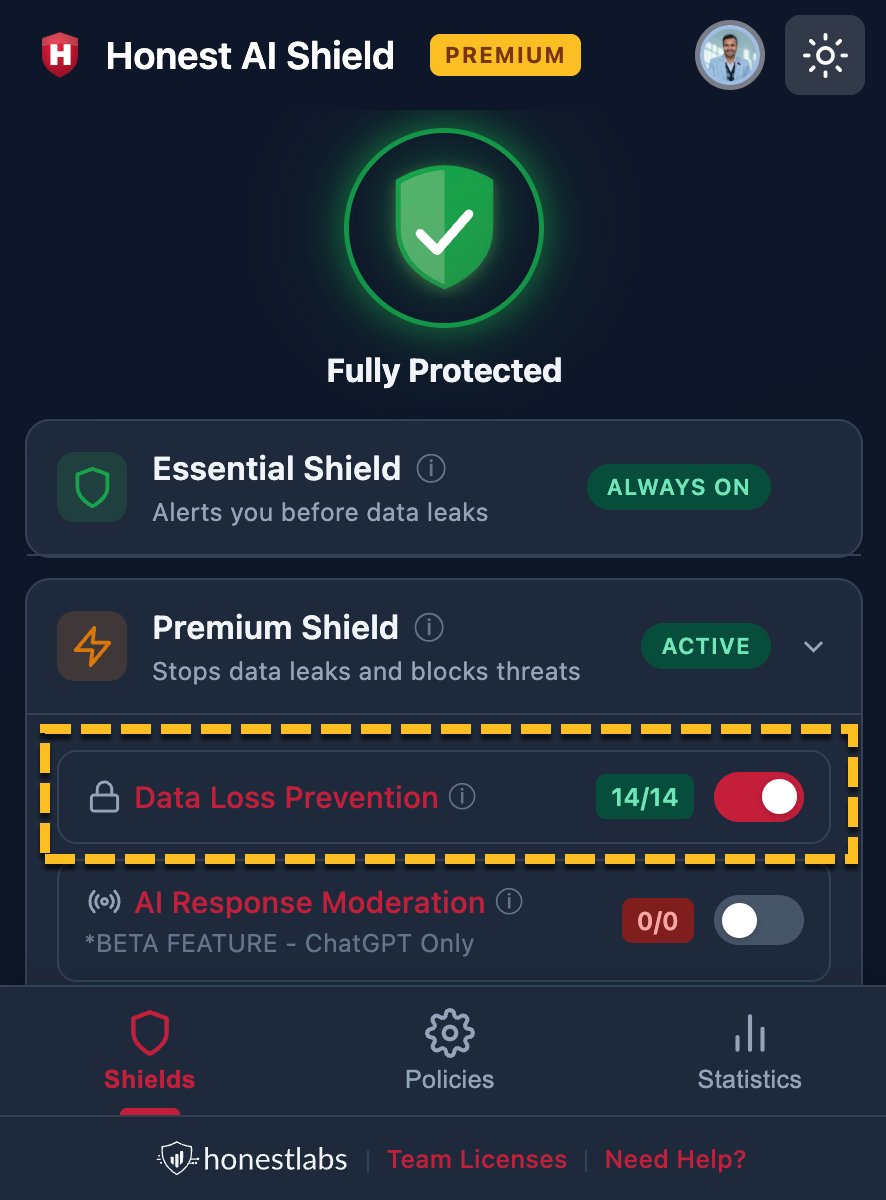
- Click the Honest AI Shield icon in your toolbar
- You are on the Shields tab by default
- Click the Premium Shield section to expand it
- Find "Data Loss Prevention" and flip the toggle to on (the toggle turns coloured when active)
What DLP detects
When DLP is on, the extension scans for 30+ supported data types across the categories below.
Data loss prevention - supported data types
Note: Example values illustrate valid formats only. Whether the extension flags a string depends on your policies and implementation.
| # | Category | Data type | Example |
|---|---|---|---|
| 1 | PII | Email address | jane.doe@example.com |
| 2 | PII | US Social Security Number (SSN) | 219-09-9999 |
| 3 | PII | Canadian Social Insurance Number (SIN) | 046-454-286 |
| 4 | PII | UK National Insurance Number (NINO) | AB123456C |
| 5 | PII | UK NHS Number | 943 476 5919 (10-digit, modulus 11 check digit) |
| 6 | PII | Australian Tax File Number (TFN) | 123 456 782 |
| 7 | PII | Australian Medicare Number | 2119 43181 1 |
| 8 | PII | Indian Aadhaar | 4323 2323 2112 (12 digits, Verhoeff checksum) |
| 9 | PII | Indian PAN | ABCDE1234F |
| 10 | Financial | Credit card — Visa, Mastercard, Amex, Discover | 4111 1111 1111 1111 (Visa, Luhn-valid test) |
| 11 | Financial | IBAN (70 countries) | GB82 WEST 1234 5698 7654 32 |
| 12 | Secrets & API keys | OpenAI API Key | sk-abcdefghijklmnopqrstuvwxyz1234567890123456789012 (48 characters after sk-) |
| 13 | Secrets & API keys | OpenAI Project Key | sk-proj-abcdefghijklmnopqrstuvwxyz1234567890123456789012 (sk-proj- + 48 characters) |
| 14 | Secrets & API keys | Anthropic API Key | sk-ant-api03-abcdefghijklmnopqrstuvwxyz1234567890ABCDEFGHIJKLMNOPQRSTUVWXYZ |
| 15 | Secrets & API keys | Google API Key | AIzaSyDaGmWKH4Od6Jox6t9pfW7tdt92zNx0qjc |
| 16 | Secrets & API keys | AWS Access Key | AKIAIOSFODNN7EXAMPLE |
| 17 | Secrets & API keys | AWS Secret Key | wJalrXUtnFEMI/K7MDENG/bPxRfiCYEXAMPLEKEY |
| 18 | Secrets & API keys | GitHub Personal Access Token | ghp_0123456789abcdef0123456789abcdef012345 (36 characters after ghp_) |
| 19 | Secrets & API keys | GitHub OAuth Token | gho_0123456789abcdef0123456789abcdef012345 |
| 20 | Secrets & API keys | GitHub User Token | ghu_0123456789abcdef0123456789abcdef012345 |
| 21 | Secrets & API keys | GitHub Server Token | ghs_0123456789abcdef0123456789abcdef012345 |
| 22 | Secrets & API keys | GitHub Refresh Token | ghr_0123456789abcdef0123456789abcdef012345 |
| 23 | Secrets & API keys | Stripe live secret key | sk_live_51Hxxxxxxxxxxxxxxxxxxxxxxxxxxxxxxxxxxxxxxxxxxxxxxxx |
| 24 | Secrets & API keys | Stripe test secret key | sk_test_4eC39HqLyjWDarjtT1ChupKtK |
| 25 | Secrets & API keys | Stripe live publishable key | pk_live_51Hxxxxxxxxxxxxxxxxxxxxxxxxxxxxxxxxxxxxxxxxxxxxxxxx |
| 26 | Secrets & API keys | Stripe test publishable key | pk_test_TYooMQauvdEDq54NiTphI7jx |
| 27 | Secrets & API keys | Slack token | xoxb-123456789012-1234567890123-AbCdEfGhIjKlMnOpQrStUvWx |
| 28 | Secrets & API keys | Twilio API key | SKxxxxxxxxxxxxxxxxxxxxxxxxxxxxxxxx |
| 29 | Secrets & API keys | SendGrid API key | SG.wxYZ.wxYZwxYZwxYZwxYZwxYZwxYZwxYZwxYZwxYZwxYZwxYZwxYZ |
| 30 | Generic patterns | Generic API key | api_key_abcdefghijklmnopqrstuvwxyz1234567890 |
| 31 | Generic patterns | Generic secret key | secret_abcdefghijklmnopqrstuvwxyz1234567890ABCDEF |
| 32 | Generic patterns | Generic access token | access_token_abcdefghijklmnopqrstuvwxyz1234567890 |
| 33 | Network | IP address (IPv4 & IPv6) | 192.0.2.1 (IPv4, documentation range); 2001:db8::1 (IPv6, documentation range) |
| 34 | Custom | User-defined keywords | (your list in Policies) |
How to adjust what DLP looks for
The counter next to the DLP toggle (e.g., "5/7") shows how many detection types are currently active out of the total available. To change which types are active:
- Go to the Policies tab
- Expand "Data Loss Prevention"
- You will see two subsections:
- Privacy Controls — general data types (keywords, secrets, credit cards, emails, IP addresses)
- Region Specific — government ID numbers for specific countries
Toggle each detection type on or off depending on what matters to you. See Customising DLP Policies for full details.
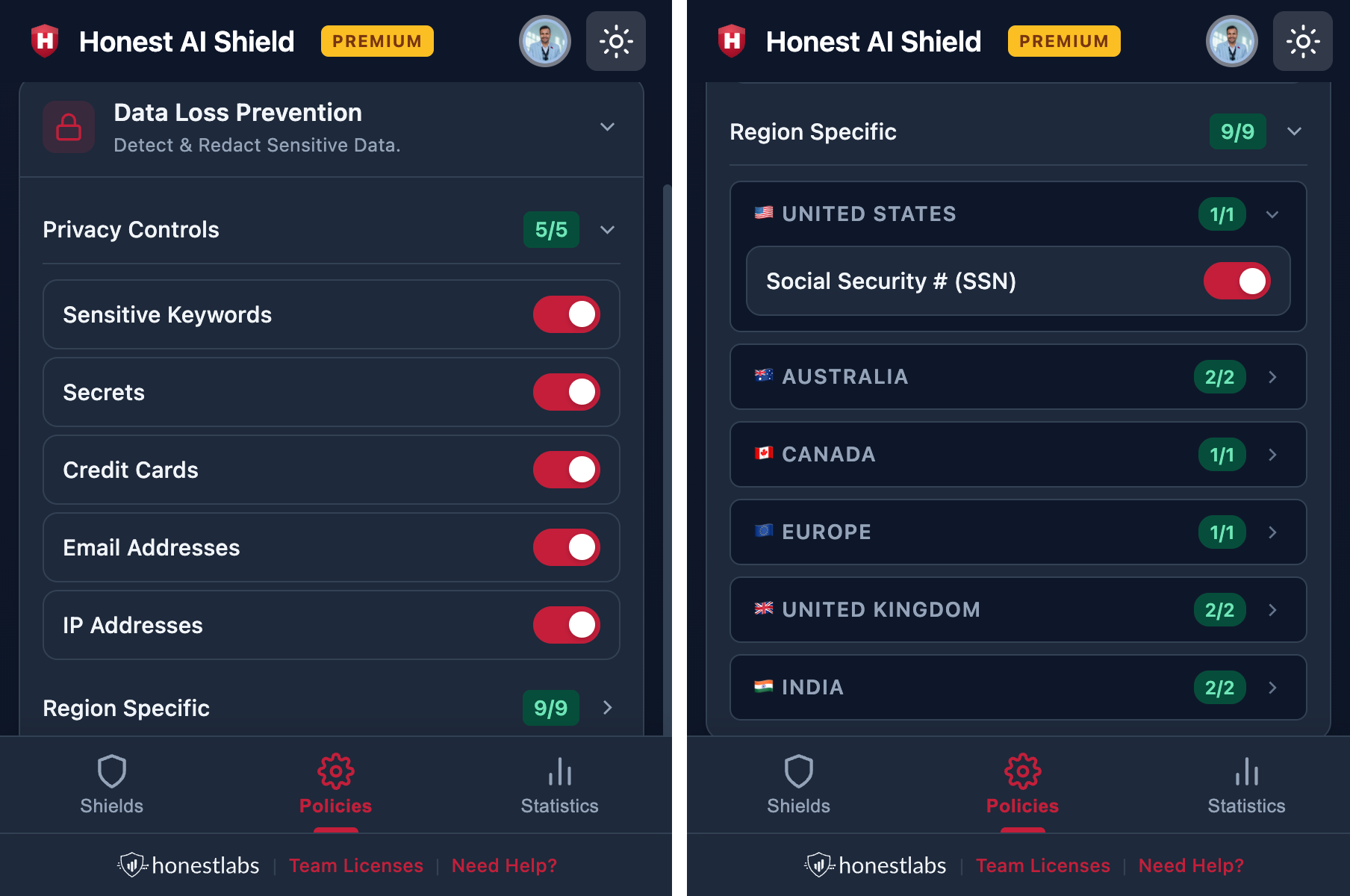
The DLP toggle must be turned ON in the Shields tab for any of these policy toggles to take effect. The Policies tab controls what gets detected; the Shields tab controls whether detection runs at all.